
Connects your Mac to SMB shares silently, automatically, and without friction. Set it up once — it handles the rest.
Completely free · No account needed · macOS 13+

Features
Everything you need.
Nothing you don't.
NAS-Mountie is built around one principle: your NAS should be available when you need it, without you having to think about it.
Silent auto-mount
Reconnects your saved shares automatically when your Mac wakes on a known network — no clicks, no windows, no interruptions.
Network profiles
Saves a separate NAS profile per Wi-Fi network. Home, office, studio — each network remembers its own shares and credentials.
Keychain security
Credentials are stored in the macOS Keychain — never in plain text, never in app files. Your password stays on your Mac.
Menu bar native
Lives quietly in your menu bar. A single click opens the popover — no Dock icon required, no app switching needed.
Multi-share mounting
Browse all available SMB shares from your NAS, select one or several, and mount them in a single action.
Launch at login
Starts automatically with your Mac. By the time you sit down, your shares are already mounted and ready.
How it works
Set up once.
Works forever.
Enter your NAS details
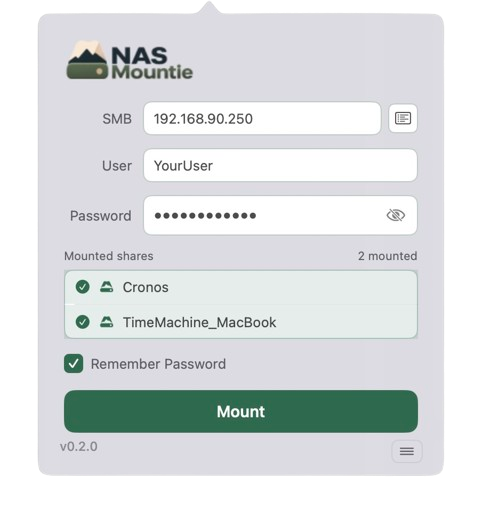
Type your NAS IP address, username, and password in the popover.
Browse and select shares
NAS-Mountie discovers all available SMB shares. Pick one or several.
Mount and save
Click Mount. Enable Remember Password to save a profile for this network.
Done — forever
Next time you're on this network, shares mount automatically and silently.
Why NAS-Mountie
Built for people who just want
their drives to be there.
-
Completely free No subscription, no trial, no IAP. Download and use it as long as you want.
-
No Finder dialogs or windows Mounts happen silently. No native connection prompts, no Finder windows opening.
-
Per-network memory Works across multiple networks. Each Wi-Fi network gets its own NAS profile.
-
Open source Full source on GitHub. Inspect it, fork it, contribute to it.
Ready to mount
and move on?
Free download. No account. No subscription.
macOS 13 or later.